Showing posts with label Blogging. Show all posts

Sunday, 28 August 2016

Chilling

SWANK August round is coming to a close on August 31st. So there is still time for some last minute shopping, such as the Alec outfit from Ghostyss. After the event you can head on over to the Ghostyss main store to pick up the outfit which consists of a pair of jeans and a very nice textured shirt with Tie and Waistcoat. It comes in 5 different mesh sizes with alpha of course.

The incredible detailed Chaise Elegante PG is from OTB! includes several poses, is also on sale at SWANK.

The image below was published in ENVY Magazine 3.0


Style Cards:
Ghostyss ~ ALEC - Mens Button Down Shirt, Tie & Waistcoat - SWANK August Round
Ghostyss ~ ALEC - Mesh Blue Jeans v3 (black) - SWANK August Round

Hair

Dura ~ Boy*61 - Black

Head

Catwa ~ Jackson

Body

Slink Mainstore ~ Slink Physique Male 
Slink Mainstore ~ Slink Hands

Skin

L'etre Homme ~ Dave [Golden]

Shoes

Cold Ash ~ JERICHO Dessert Boot

Props

OTB! ~  Elegante Chaise Set PG - SWANK August Round

Thursday, 25 February 2016

You can leave your hat on

Across the street from Glint Jewelry is a clothing store - Serendipity, which I have the pleasure of featuring this weeks outfit for.

Starting at the top, the ball cap is HUD controlled with five different colors and two types of metal silver and gold. A really convenient re-sizer is also in the HUD. Great idea!


The sweater and pants is also HUD controlled, 11 colors for the sweater and 10 different colors for the pants and pockets.

 This weeks L$55 item from Glint Jewelry is this very nice Leather Skull bracelet. Looking up close it has really nice leather textures. A great find.


Style card:


Outfit:

Jewelry:


The blog post can also be found on http://scottnobody.blogspot.com/

Wednesday, 17 February 2016

She's mine

Another really nice treasure from Glint Jewelry & Accessories is this customize-able block letter bracelet for both him and her. When you purchase this bracelet, all you have to do is to fill out the accompanying note-card and return it to Rainbow. She will very quickly personalize your bracelet and sent it back to you. I believe a total of 6 letters of your choice is maximum on each bracelet. The bracelet is easily adjustable via a script dialog box, and making sure it sits right on your wrist is of course done via the edit menu.

The outfit I'm sporting on this beautiful morning is from FashionNatic on the markedplace (link below). It's completely HUD controlled for pants, shirt and tie. 35 colors and textures for the shirt and the tie, 8 colors for the pants. There is an option for hiding the tie if you choose to do so.

Finally, a great pair of shoes from L&B, (link below). They are the WingTip Fatpack option, also complete HUD operated with several color combinations.


Click image for larger size

Style card:


Jewelry:


Outfit:

Shoes:

  • L&B - Dress shoe WingTip Fatpack


The blog post can also be found on http://scottnobody.blogspot.com/

Wednesday, 10 February 2016

Omega Compatible Gown

Nancee Gown is the new release from Sascha's Designs. It comes in 6 different colours and the option of 2 different tops and 3 skirts, a glove and a fur bolero for a more formal touch to the elegant bustier gown. Best of all, they are omega compatible. 

How omega works:

If you have a Maitreya Mesh Body Lara, wear your Maitreya Mesh body, attach the "Omega Applier Relay for Maitreya" AND wear and use your Omega Applier that comes with your outfit. Make sure the Relay stays attached when you wear your applier. 

If you have a Belleza Mesh Body, wear your Belleza Mesh body, attach the "Omega System Installer - Belleza", click the installer, and verify the mesh thanks you in local. Your mesh will now respond to Omega.

If you have a Slink Physique/ Hourglass Mesh Body, you need to make sure you have the up-to-date Slink Mesh. Wear your Slink Mesh body, attach the "Omega System Installer - Slink" and click the installer to verify the mesh thanks you in local. Your mesh will now respond to Omega.

You can buy the Omega Appliers at  99 Linden on MarketPlace or if you join the Omega Group, it is only 1 Linden at the Love-N-Lust Designs Inworld.

For more information about how Omega works or the supported Meshes, CLICK HERE.

The main reasons appliers 'don't work':
a) they do not have the Omega kit if their body requires it
b) They are not wearing it / have activated their body
c) They are on land where scripts can not run
d) they 'killed' the script in a particular body
e) they are not actually WEARING the Omega applier

Style Card
Outfit
Sascha's Designs  ~ Nancee Seafoam Gown omega compatible 
NEW RELEASE

Accessories
PurpleMoon ~ Venice Necklace and Earring [Turquoise]

Hair
Truth Hair ~ Delphine

Skin
amara beauty ~ Gabriela 03 Beige *NEW RELEASE

Picture taken at Extasia Beach

Tuesday, 9 February 2016

MenStuff Hunt - Glint Jewelry & Accessories

Being notoriously bad at hunts, I did somehow manage to find the MensStuff Hunt treasure at .:Glint:. Jewelry & Accesories the other day.

The gift contains 2 leather bracelets, one wide made of several leather knotted strings with diamond print beads, and one single string of leather with metal rings and metal beads. The single strand bracelet is easily scale-able via a HUD - just click on the bracelet, whereas the wider bracelet can be scaled via the edit menu. Both of them are a great additions to the casual guy.


Style card:

Jewelry:
Glint Jewelry and Accessories - Leather & Silver diamond print beads.
Glint Jewelry and Accessories - Leather bracelet with metal rings

Jeans:
Redgrave - Jeans HeavyUsed - Classic Cut Mesh

Shirt
Luke Tucked in White T-shirt.

Shoes:
Ryder Boots - Navarro - Ankle

This blog was also posted on http://scottnobody.blogspot.com/

Wednesday, 13 January 2016

Bring it on

7 Deadly s{K}ins has on sale at The Staff Sales Room Maryna skin that comes in 30 skins in 3 tones,with and without cleavages, and tango and phatazz appliers.


Besides that, there is a huge sales going on at the 7 Deadly s{K}ins store right now. There are also MM boards, a Riot Vendor and 2 Gacha's home from events for all. Both gorgeous Isadora and Eska girls can be yours for just 100L per play. 

So head down to 7 Deadly s{K}ins mainstore now and have fun shopping! 

Style Card
Skin
7 Deadly s{K}ins -Maryna Caramel v1 CL @ The Staff Sales Room

Skin appliers
7 Deadly s{K}ins ~ Maitreya applier [Caramel]
7 Deadly s{K}ins ~ SLINK hands & feet HUD [Caramel]

Hair
Besom ~ Berry @ FaMeshed


Monday, 11 January 2016

Photography tips #3 - Derender

By Scott Nobody

In real life photography, a little pre-photoshopping on location is time saved when editing, and by that I mean removing things (if possible of course) that has to be fixed in post editing anyway. So before the shot is actually taken, remove or fix things such as an odd twig, toys in the background, garbage, or stray hair on the model etc. Basically try and get rid of anything that doesn't belong in the final picture. You'll thank your self later if you do.

Until just recently, I thought that was more or less impossible in SL without having editing rights, but a shooting sessions with Debbie Jasper over the holidays taught me something very cool. I might be the noob here for not knowing this clever little trick, but I'm okay with that :) I'm always willing to learn and share.

The session we were on was shot over the Christmas holidays. We were shooting a gown Debbie was blogging, and the problem was there were Christmas decorations and other items that just didn't fit the theme of the gown. After have shot from a few different angles I just couldn't get a shot I liked because of the items on location. Then Debbie said - "Just de-render temporarily".  /Me: "Huh?" So she showed me, and low and behold, life just got a little bit easier.

I found some of the raw photo's from that first session. In this shot, the cat on the piano and the lamp at the end of the stage is bugging me. But to clone those items out in Photoshop looks like a lot of work so kept looking for angles where these items weren't visible, but that of course changed the look and view of the gown.


After Debbie's little revelation we went back the next day. Below is another raw shot from the second session. The cat and the lamp has been de-rendered temporarily making the post editing a lot easier. 


Here's how do this in Firestorm: 
  • Right click on the item that is in your frame, or picture that you want to remove. 
  • Click MORE in the circle - twice
  • Click DERENDER 
  • Finally click TEMPORARY
And the item such as a pose-ball, tip jar or perhaps a person in the back ground is gone. You have a much cleaner raw photo to work with in Photoshop.

Thank you Debbie :)

One thing to keep in mind when doing this, is to be very careful what you click on. I lost the floor the first time I tried but a quick relog fixed it, and I could start over with de-rendering unwanted items again. 

Here's a link to the gown Debbie blogged.

This blog post was also posted on http://debbiejasper16.blogspot.sg

Sunday, 27 December 2015

Photography tips #1 - Rule of thirds

By Scott Nobody

Second Life photography is so much fun, and lots of people do it. Here is a way of taking real life photography tips and bringing it into Second Life.

One of the most simple ways of improving your images is to use the "rule of thirds". When you shoot a picture in SL, typically the object ends up dead center of the shot if you don't move your camera. That is not necessarily the best spot for an interesting image. Watch any movie, magazine, billboard, even the news on TV. Pretty much everywhere, this rule is applied in some form or another.

The rule of third grid looks like this:
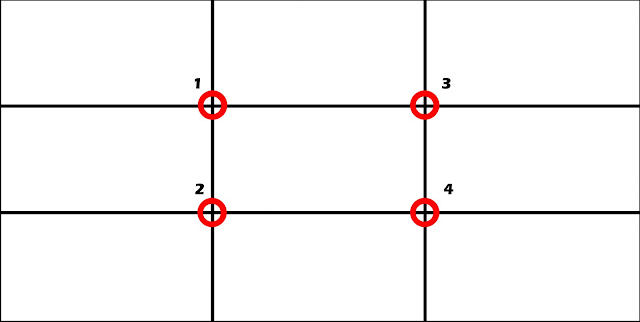

When you're framing your shot, imagine four lines that is about 1/3 of the entire length or height in from either edge. Where those lines intersect, you have a focal point (red circle). A point where the eye almost automatically goes to right away when we look at an image. You can use this to your advantage and position your object, in one of those intersections. It can be in anyone of the four intersections, just pick one that looks good to you. 

Fun fact: Most people will look at the top left intersection first, then the bottom left, then the top right and so on. You will quickly find out using this method, your images will look more pleasing to the eye.


The lines are also very helpful. In landscape shots for example, you want to the horizon line to run along one of the two horizontal lines in the grid - a third from either the top or the bottom.
The vertical lines can be used to line up a tall structure or a person in just the right spot.
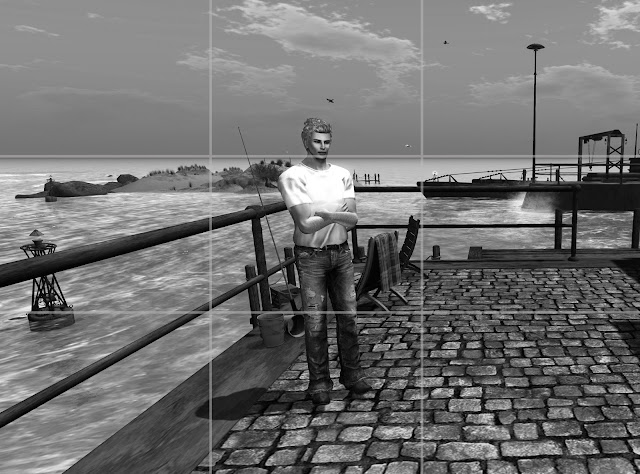


Not the optimal position of the subject, even though the horizon is located along the right line.
If you know you are going to be editing the image in Photoshop or Gimp later, try to make sure to leave extra room for a crop if that's is your intentions. With the crop tool in Photoshop or Gimp you can easy put the object in the desired spot, however, having not done that at the time of shooting, you will now have eliminated a lot of good pixels. Something to think about :)

Last but not least,  - this is a more a guide than a rule. - Rules are there to be broken, and very often you will get an interesting result by doing just that. An example on that could be a shot where the back ground is 100% symmetric or perhaps there is a perfect reflection. But more often than not, using this guide, or rule, will give you a better image, and should result in more favs on Flickr.

Bonus tip: Both Gimp and Photoshop has the rule of third as a guide preset already built in. Here's how you turn them on when you're using the crop tool.

Photoshop:
Select the crop tool, (C) - in the tool bar, click the mesh looking icon, and select the Rule of Third grid. Now drag from corner to corner to select the entire image. As soon as you let go of your mouse the grid will pop up and you can now adjust the handles on each side of the cropping window to place the image the way you like it.


Gimp:
Click the pen cutter like tool....?! (Shift+C) to select the crop tool. In the drop down list, chose Rule of Thirds guides. Now drag over the entire image and your grid will be drawn out. Now you can adjust the crop by using the handles in each corner to get the composition right.


Thursday, 24 December 2015

Being casual

By Scott Nobody

Ahh...the casual look. A pair of jeans, a t-shirt, some shoes or boots and perhaps a jacket. It's a look that a lot of guys in Second Life use. Im my opinion the casual look just got even better. I was at TMD - The Mens Department awhile back, where Cold Ash had a small display of one or perhaps two of their outfits. A quick visit to their main store, and I was sold on the out fit below. All 3 items are of course mesh and were purchased separately.


The jacket is the Ryder. It can be used with or without the T-shirt, and in the including HUD you will find 6 great leather textures in different colors for the jacket, and 6 muted colors for the T-shirt making it easy to find a good look.

(Click any picture for a larger view.)

The jeans are called Ocelot, a nice straight fit, very worn looking pair (but not ripped),. The HUD gives the choice of 6 tones from light blue to black
Last but not least to complete the look, I chose the Jericho desert boots. It's a short boot, and goes perfect with the jeans and other long pants. Again there is an option for picking a color to go with the rest of the outfit, this time 5 different tones ranging from Copper (light brownish) to Black.


Style card:

Outfit:

  • Mandala - Inari Necklage (short)

Picture location - Tempelhof